

For nonprofits and institutions
Your donor list is worth more than it brings in
DoneRaise runs the whole campaign from one place: a fundraising plan built from your own giving history, a team that knows exactly who to call and what to ask for, and every donation you receive landing on the right record.
No spreadsheets making the rounds, and no end-of-campaign surprises.
One campaign, run in the system from start to finish:
Here's how it works
From the lists you already have to a campaign that's running.
Upload the lists
You upload the files. The system does the cleanup.
Build the fundraising plan
Before anyone picks up a phone, you know who to ask and how much to ask for.
The team goes to work
Everyone opens their phone and sees who to call and what to ask.
Donations land in the right place
Every donation comes from your payment platform straight to the right donor.
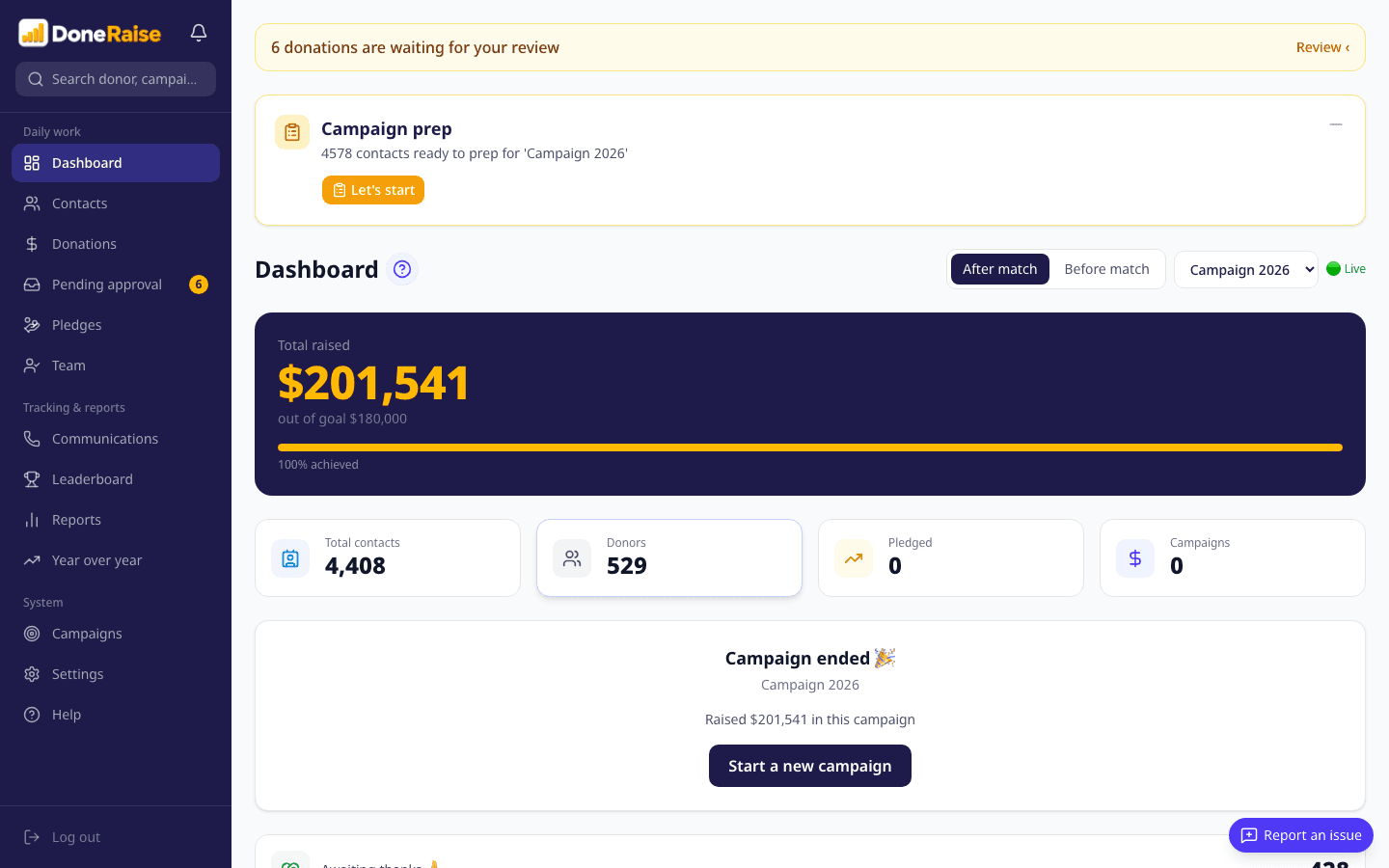
Know where the campaign stands
See where you are at any moment, clear and simple.
And now in detail
- 1
Setup
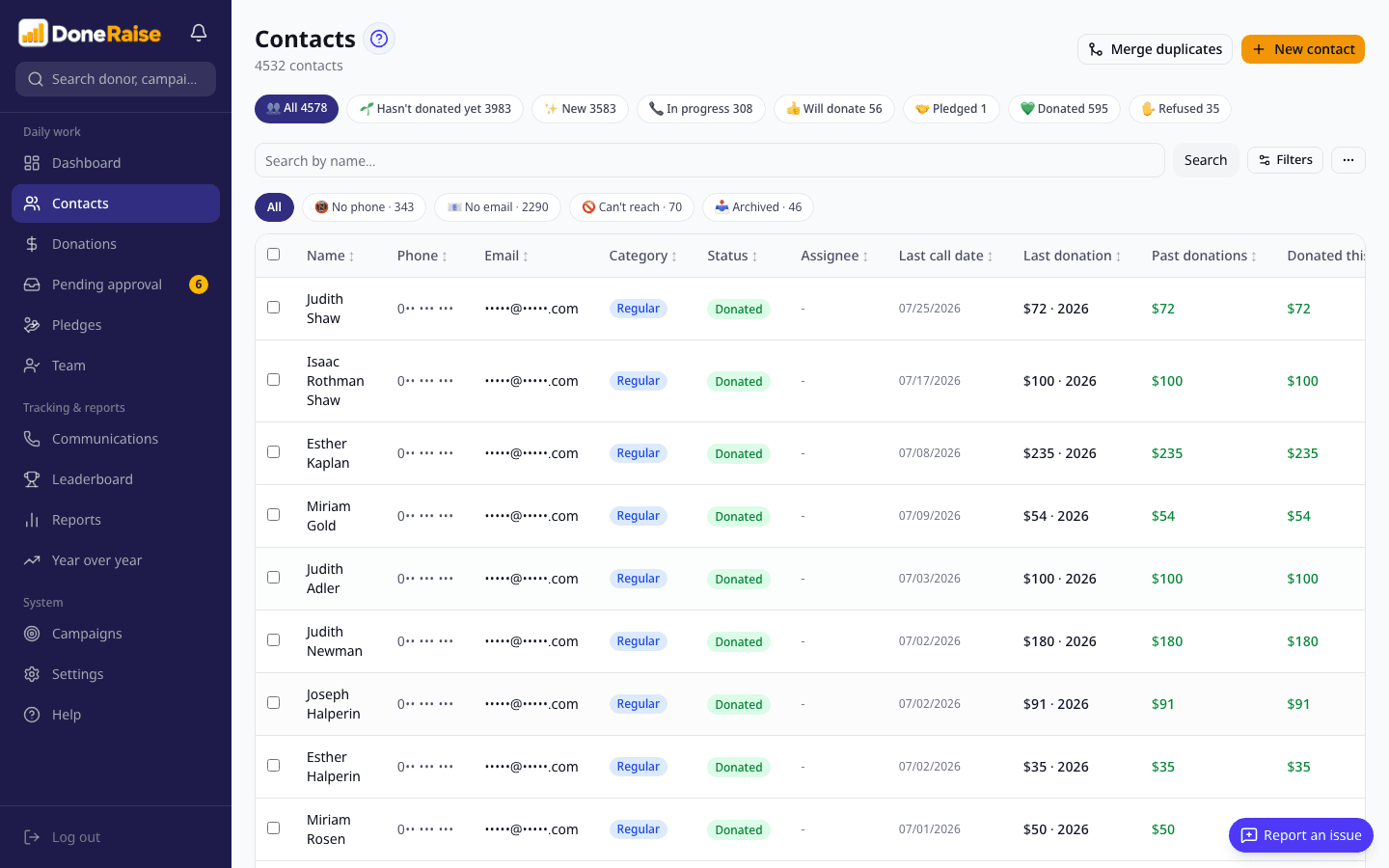
Upload the lists
You upload the files. The system does the cleanup.
Everything you've accumulated - old files, spreadsheets, lists from three different places - ends up in the same place. The system flags anyone who shows up more than once so you can merge them in a click, and you set the categories to match how you actually work. Instead of a pile of files nobody's really on top of, you get one clean list. That's what the fundraising plan gets built on.
- 2
Preparation
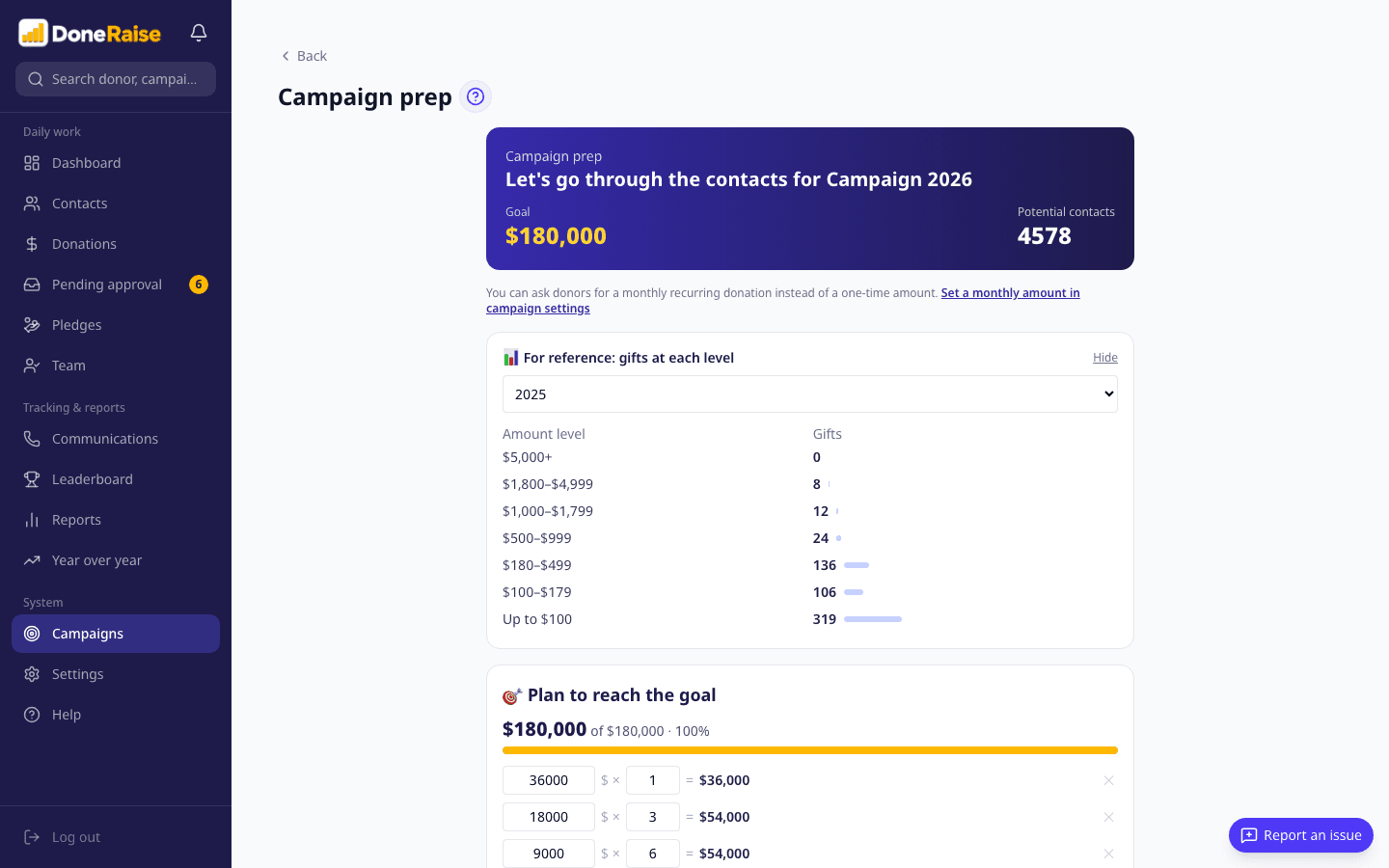
Build the fundraising plan
Before anyone picks up a phone, you know who to ask and how much to ask for.
You set the number you want to raise, and the system shows what it takes to get there: how many major gifts, how many mid-size, how many small. Not from a hunch - from what these people actually gave you in past years. Then you go through the contacts one at a time and decide who's in and what to ask each of them. What you end up with is a real plan. And if a tier is short of candidates, you find that out now instead of in the last week.
- 3
Outreach
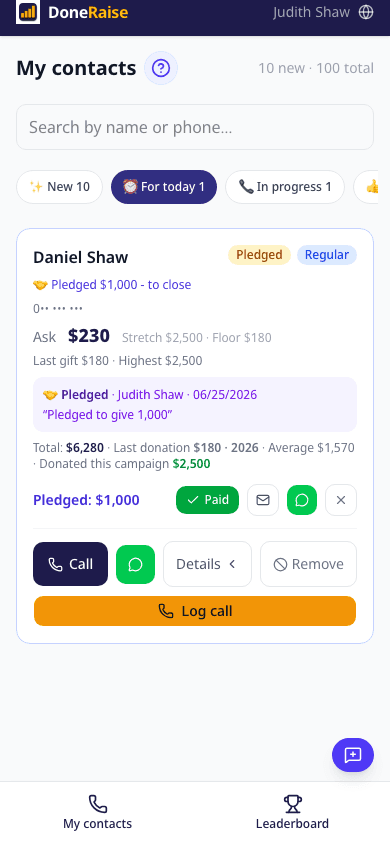
The team goes to work
Everyone on the team opens their phone and sees exactly who to call and what to ask for.
No printed lists, no "wait, who's calling him?", no calls slipping through the cracks. Each person sees only their own list, and every card has all of it: name, number, the ask, and what was said last time. Logging the call takes one tap. Two people will never call the same person, and anyone who pledges comes back as a reminder on the day and time you agreed - so nothing quietly gets dropped.
- 4
Donations
Every donation lands in the right place
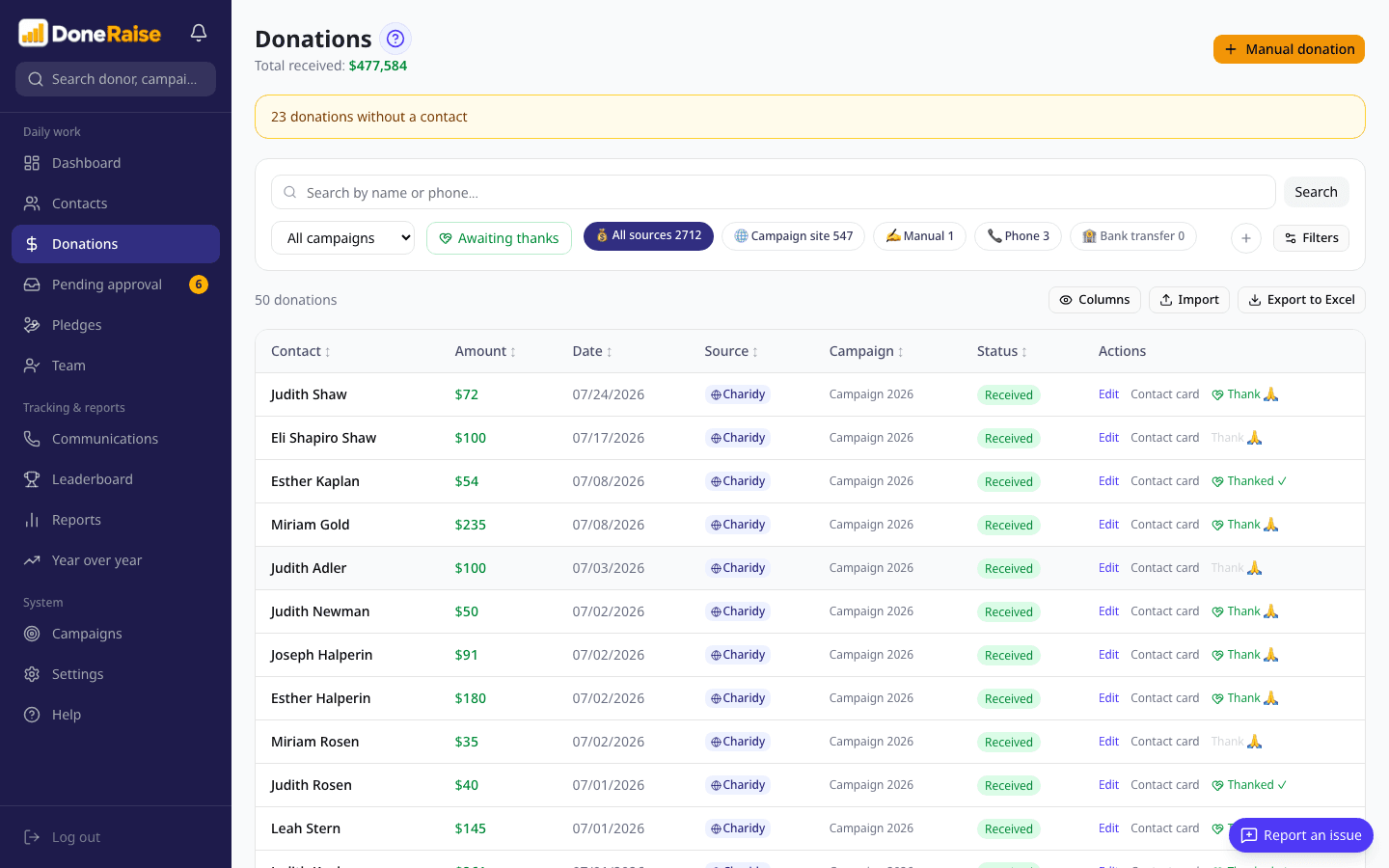
Every donation comes from your payment platform straight to the right donor.
No more evenings spent cross-checking reports. A donation made through your payment platform arrives on its own and matches itself to the right donor; a check, a transfer or cash gets recorded in the same place. Anything that looks off is held for review before it reaches the totals - so the number on your screen is the real one.
- 5
Reporting
Know where the campaign stands
See where you are at any moment, clear and simple.
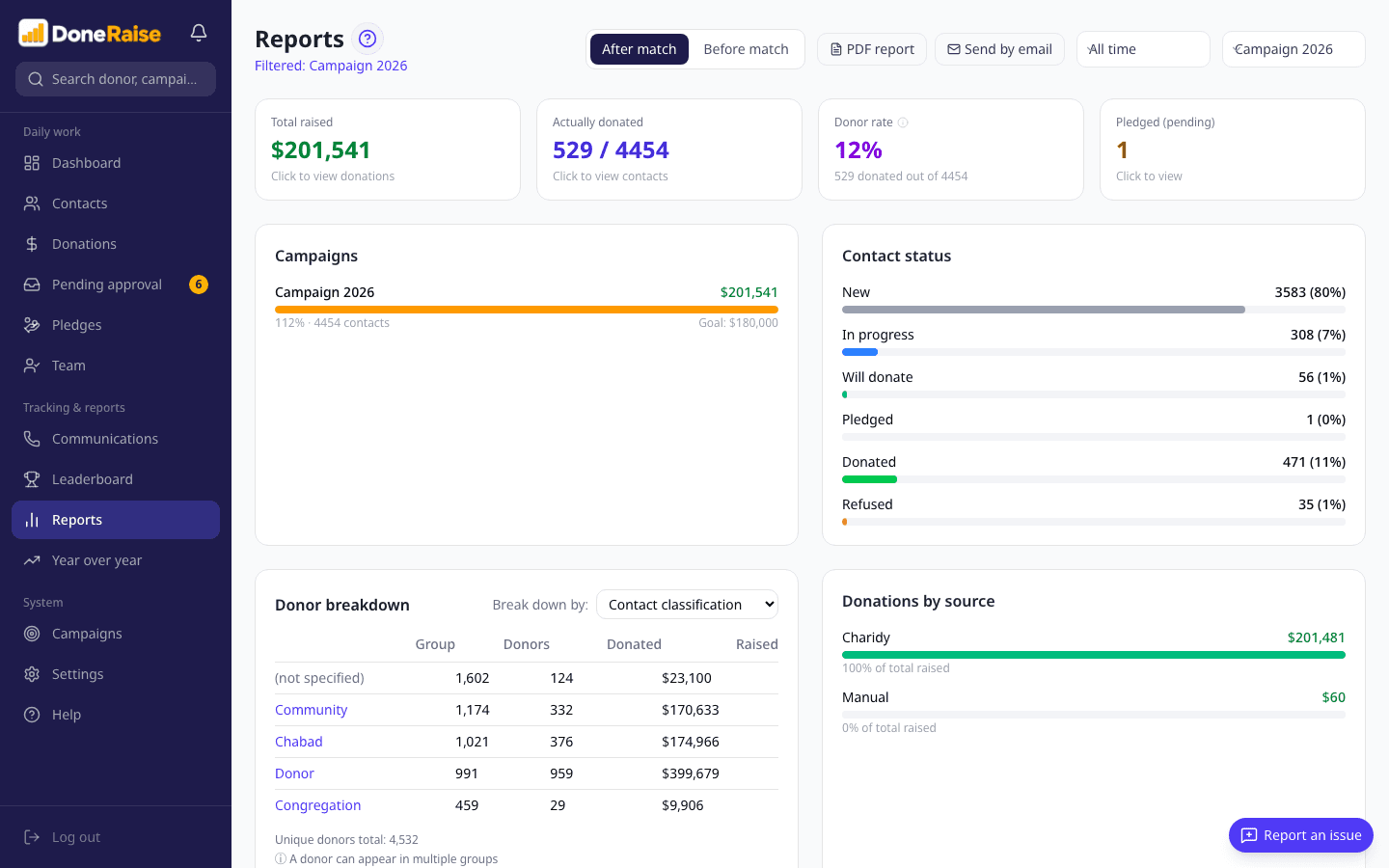
Instead of waiting until the campaign is over to find out how it went, one screen tells you now: what's come in, who on the team is moving, and what's likely by the end. You can compare against last year, put the leaderboard up on a screen in the office and let the team watch itself climb, and send a report as a link that opens without a password.
We built this for organizations that fundraise from a list they already have - by phone, by WhatsApp, or both. What you get back is the quiet of knowing who spoke to whom, what was pledged, and exactly where the campaign stands, without chasing a single person for an update.
This is for you if
You have a donor list from past years, even if it's scattered across a dozen files
You have a few people making the calls, or sending the messages
Your goal is $20,000 or more
You want to know at the end what worked, not just what came in
If you have no list to work from, or everything you raise comes in online with no personal outreach, we're probably not the right fit - and we'll say so on the first call.
What it looks like in a real campaign
Chabad of Melbourne, Australia
- Starting point
- 4,578 contacts, in lists that had piled up over seven years
- Goal
- $180,000
- Preparation
- The goal broken into gift tiers, the list filtered, the work split across 14 people
- During the campaign
- 1,475 outreaches logged
- Result
- $201,541112% of goal
They ran the campaign in DoneRaise: seven years of scattered lists became one fundraising plan, 14 people worked from the same system, and every call, pledge and donation was recorded in one place.
It was the first time the phone numbers were all in order and the lists were in order. I knew exactly who gave how much and when, and how to assign them to the callers. Everything was so much easier. The team took responsibility and was with us the whole way, and it all ran lightly and smoothly.
Chabad of Melbourne, Australia
Who we are
DoneIt has been building systems and apps for nonprofits and institutions for eight years, day in and day out. Dozens of them, and each one taught us up close how an organization really works: where the lists break down, what falls through the cracks, and what a campaign looks like from the middle of it.
We built DoneRaise because managers kept asking us for the same thing: order. Not another spreadsheet getting passed around, but one place that holds the plan, the calls, the pledges and the donations - from the first day of prep to the closing report.
DoneIt, led by Pesi Wenkert
Pricing
One price, for the whole campaign
- Account setup, configured around how you work
- Unlimited contacts
- Unlimited team members
- Your payment platform connected, with donations syncing automatically
- Already on Chabad Airtable? The data import is on us
- A one-to-one training call
- 1,500 SMS messages
- WhatsApp and email support for the whole campaign
- A complete help center in English
When the campaign ends, the data is still yours. Log in, look at it, export it - at no extra cost. And next year's campaign starts where this one left off.
Let's plan your next campaignPriced separately
What the package doesn't cover, with the price up front. Hourly work starts only after you've approved a quote.
- 1,000 more SMS messages$100
- Done-for-you setup - we upload your files, merge the duplicates and hand you a system that's ready to go$150/hour
- Extra training, automations and customizations$150/hour
- Dialing from the browserBy minute bundle, set when you switch it on
All prices in US dollars.
Everything else it does
Setup12 features
- Excel import, with a preview before anything lands
- Your donation history, imported too
- Duplicate merge that keeps every detail
- A ready-made Excel template
- Your own categories and statuses
- Saved filters you can reuse
- Your logo and your currency
- Your system language, and the language donors get messages in
- Invite your team, set permissions, revoke access
- A setup checklist, step by step
- A guided tour of the system
- Chabad Airtable connection · available on request
Preparation16 features
- A calculator: how many gifts it takes to hit the goal
- Gift tiers built from what people actually gave
- Four groups: major, lapsed, past donors, new
- A suggested ask for each person, with a range
- Going down the list one person at a time
- A flag when a tier is short of candidates
- Ask for a recurring monthly donation instead of a one-time amount
- Automatic distribution across the team
- Assign by typing a sentence in plain English
- Undo a whole distribution in one click
- A personal goal for every team member
- Call scripts
- Several campaigns running at once
- A separate currency per campaign
- A goal and dates per campaign
- Base the suggested ask on their last gift, their average, or their highest
Outreach18 features
- A personal screen on the phone for everyone on the team
- Add it to a phone's home screen
- Log the call and how it went
- No two callers on the same person
- Callback reminders
- Pledges tracked through to paid
- Nudge someone who pledged
- Hand a contact over to the manager
- Send a donation link on WhatsApp
- Send a thank-you on WhatsApp in one tap
- Send a thank-you by email
- Fast search across everything
- Live updates on every device
- Notifications for the manager
- Automatic SMS when nobody picks up · available on request
- Opt-outs and quiet hours · available on request
- SMS quota and usage tracking · available on request
- Dial straight from the browser · available on request
Donations9 features
- Record a donation by hand
- Donations matched to the right contact automatically
- A queue for donations waiting on approval
- Duplicates and mismatched currencies flagged
- Matching: every donation counted twice
- Manage your matching sponsors
- Record a donation with no name attached
- The original currency kept alongside the conversion
- Automatic intake from payment platforms · available on request
Reporting11 features
- A dashboard that updates as it happens
- The full report: team performance, sources, answer rates
- Send a report by email
- Share a report as a link, no sign-in
- A version built for printing
- Year-on-year comparison
- Donor segmentation
- A forecast to the finish
- A leaderboard for the team
- Export to Excel
- Big-screen display for the office · available on request
Support & account3 features
- A help center in English
- Reach support from any screen
- Your package status
Common questions
How long does it take to get started?
One to two weeks to set up, then one to two months of prep before the first call. That time isn't wasted - it's what decides how much you raise.
We already collect donations through a payment platform. Will this get in the way?
No - it works alongside your platform, not instead of it. You keep collecting exactly as you do now, and donations arrive in the system on their own. Anything that comes in outside the platform - a check, a transfer, cash - is recorded in the same place, so you get one real number instead of three you have to add up. The money itself keeps moving through your payment platform, exactly as it does today - we never touch it, so your agreement with your processor doesn't change. There's no fee from us on donations either - the price is fixed, regardless of how much you raise.
We're a small organization. Is this for us?
The price is the same for everyone, so the question isn't how big you are - it's how much you raise. From $20,000 up, the price is at most a tenth of the campaign. All you need is a list and a few people willing to call.
Our lists are scattered across a dozen files and none of it is organized. Where do we start?
Upload them as they are. The system imports from Excel, finds duplicates by phone and email and offers to merge them without losing anything - which clears up most of the list on its own. The decisions stay with you, because only you know whether two similar rows are really the same person. If the files come from several different systems and need real cleanup, we can do that as a separate job - and we'll tell you on the call whether that's your situation.
Our team isn't technical. Is that a problem?
Nobody has to learn a system. You open your phone, see who to call, and tap. We open the account and run a training call, and from there you run it yourselves - with a help center in English one tap from any screen.
Do we need to install anything?
No. It opens in a browser on any computer, and your team can add it to a phone's home screen so it opens like an app.
What happens to our data when the campaign ends?
It's yours, and you can export all of it to Excel whenever you like, even a year later. That's also what makes next year easier: every call, pledge and donation from this campaign is the history the next plan is built on.
Is our donor data safe?
Yes. It sits in a secure cloud with full separation between organizations, so no one else can see your list. We make no other use of it, and it's yours to export at any time.
Can we run more than one campaign at once?
Yes - each with its own goal and its own currency.
How to get started
Intro call
20 minutes. We'll work out the goal, how many contacts you have, and how many people you can put on the phones.
Setup
We open the account, connect your payment platform and run a training call. You upload the lists, and the system finds the duplicates before you approve anything. Setup begins within 5 business days of payment.
Prep, then you start dialing
One to two months building the plan, then the campaign goes live. At the end you sit down with the summary and see what worked. All inside the three months.
Good preparation starts early
Your next campaign can look different: a plan instead of a guess, a team that knows what it's doing, and one real number the whole way through. Setup and prep take one to two and a half months, so the earlier you start, the more room you have - and a 20-minute call will tell you whether this is right for you.